Close the month with your AI assistant
How your AI closes a month on RoboLedger. It finds what's blocking, drafts the adjusting entries, shows you what will post, and closes when you approve.
Closing a month in RoboLedger locks the period, posts its adjusting entries, and saves that month's balance sheet, income statement and cash flow. Your AI assistant does the legwork. It checks what's blocking the close, drafts the entries, and shows you every one before anything posts.
Close is the last thing to set up, on purpose. Connect your books, ask questions, build reports and plans first. Once you trust the numbers, closing is the same conversation with one more step.
What the conversation looks like
Recorded in ChatGPT, on a demo company's books.
You: What's blocking the August close? Don't close anything yet.
Nothing is blocking August. Five entries are drafted and ready for review, they balance, and nothing has posted.
You: Show me the entries that will post when August closes.
Five entries dated August 31: tooling prepay and insurance amortization, and depreciation on computer equipment and the office build-out. $7,388.88 of debits and credits, all local, none written to QuickBooks.
You: Looks right. Close August.
ChatGPT asks you to allow the close before it runs. Then the receipt: five entries posted, no rule failed, the month's statements saved, and the close target moved to September.
Before your first close
- Your books are connected and synced. See Connect your books to your AI assistant.
- Your chart of accounts is mapped. A close still posts without it, but it can't save the month's statements. Map before you close: once a month is closed, the mapping of an account with activity in that month can't change unless you reopen it. See Map your chart of accounts.
- Your recurring entries are schedules. Depreciation, amortization and prepaid expenses that roll off each month are set up once as schedules, and every close drafts them. Your assistant can build them with you. It reads a past month's entries for the amounts and asks you for what history can't tell it, like an asset's cost, its useful life and the method. See Schedules for recurring entries.
- Your own procedures are written down, if you have any. Ask your assistant to save them as a close procedures document. It looks for that document before every close and follows it.
What happens during a close
- Your assistant checks where you stand. It reads the last closed month, whether your QuickBooks sync is current, and anything blocking the next close. Months close in order, one at a time, and a month can't close until it's over.
- It clears the blockers with you.
- The sync is behind. Your assistant runs a fresh sync and waits for it.
- Transactions changed in QuickBooks after they synced. These are normal. Your assistant shows you each one, and you choose to restate the month it belongs to, post the difference in an open month, or mark it as already handled. You can also settle them yourself under Changed transactions in the Closing Book. See When QuickBooks changes after a sync.
- A schedule ends this month. If an asset was sold or a policy cancelled, end its schedule before the month's entries are drafted.
- A schedule's entry for the month isn't drafted yet. Your assistant drafts it.
- Events dated in the month never posted. Once the month closes they could never post into it, so the close waits. In Ledger → Inbox, check both Captured and Classified for events dated in the month that have no entry, and approve or reject each one. See Review events in the Inbox.
- A reconciliation the close waits on isn't ready. It doesn't tie, it's out of date because the books changed after it ran, it hasn't been run for the month, or it's waiting for a sign-off. Your assistant runs them again and shows you what's different, and you sign off where a review is needed. See Reconcile your accounts.
- It drafts the month's entries. Every active schedule gets its entry for the month, plus any one-off adjustment you ask for.
- It shows you the drafts. Every entry with its debits and credits, whether they all balance, and which ones will be written to QuickBooks.
- You approve, and your assistant closes the month. Posting the entries, checking that the balance sheet balances, and marking the month closed happen in one step.
- Your assistant reads you the receipt. How many entries posted, how many went to QuickBooks, and whether the month's statements were saved and passed their checks.
Running the close in shadow
If you keep closing from a spreadsheet for now and want to see how RoboLedger's close would have gone before you change anything, set the QuickBooks connection to shadow. Everything above still happens, with one difference: nothing is written to QuickBooks and nothing is posted. You book your own entries in QuickBooks as you always have; they sync down. Then your assistant runs the close. Each drafted entry becomes an expectation rather than a posting, and the receipt lists what would have blocked the close, such as an account that didn't reconcile or an accrual with no entry, instead of refusing. The month's statements are saved from what QuickBooks holds. When you trust it, switch the connection to QuickBooks authoritative and the next close posts for real. The months you closed in shadow keep their receipts and their expectations as they were; switching the setting never posts them.
A busy month can take longer to close than your assistant's call waits for. The close keeps running, and your assistant checks back until the receipt is ready. It never needs to be started twice.
The close playbook tells your assistant to show you the drafts and wait for your explicit approval before it closes. Your MCP client may also ask you to allow the call. RoboLedger marks every tool that changes your books as a write, so a client set to ask before making changes, such as ChatGPT's Allow read-only tools, asks every time. ChatGPT's default setting approves some writes it judges low-risk without asking.
Overrides
A few blockers can be closed over on purpose. In the app, Allow stale sync, Close without the undrafted entries and Close without reconciling appear only when that blocker is the only one in the way. Your assistant can close over those three, and also over changed transactions nobody has settled or events left unposted, but only when you tell it to. Every override is kept in the close's audit note. Clearing the blocker is almost always the better answer: a month closed over a problem keeps it.
In the app
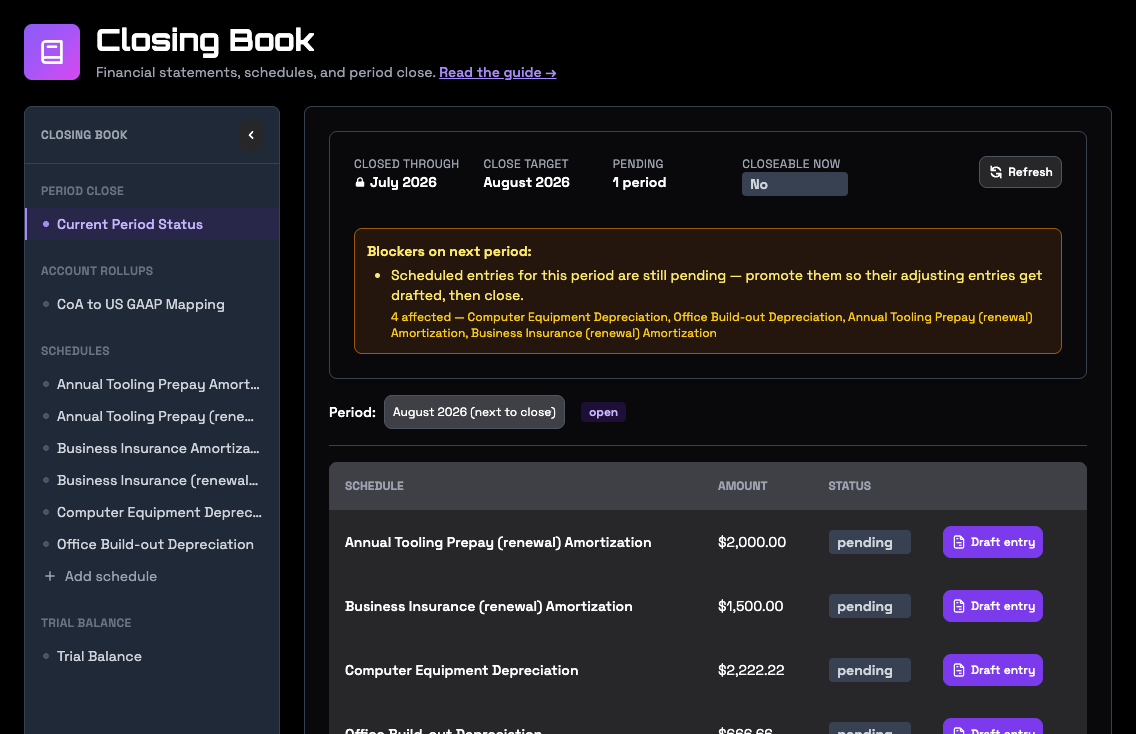
Ledger → Closing Book shows the same picture your assistant works from: the last closed month, the month you're working towards, what's blocking it, and each schedule's entry for the month with its amount and status. You can draft entries, close a month and reopen one from here too.
After the close
- Your statements for the month are saved. They're what the Plan page and Explorer show for that month from now on, and they don't move when the live ledger does.
- Run your forecasts again. The month you closed becomes an actual, and each scenario picks up from its real closing balances. See Plan and forecast with your AI assistant.
- Create a report if you send statements to anyone. See Reports and sharing.
Closing a subsidiary
Each company in a reporting group closes on its own calendar. Name the company when you ask for a close, a review of its drafts or a reopen, and your assistant works on that company's books; a close you don't name is the group parent's. Closing one company leaves the others open. In the app, pick the company in the menu at the top right and the Closing Book shows its calendar, its drafts and what's blocking its close; Entity → All Entities shows the month each company is closed through. See Work across several companies.
Close a group of companies
The group itself — how it is set up, what the consolidating entries are, and what happens when a company is bought or sold — is on Consolidate a group of companies. This section is the close.
A group with a consolidation entity closes its month as a group, and the consolidation entity's close is that close. It waits until every company the month consolidates has closed the month, including an equity-method company, whose result the group picks up. It also needs the month's consolidating entries drafted or posted, no difference the books don't explain, and the consolidated balance sheet and statement of changes in equity passing their checks. Until then it names what's holding it: the companies still open, the entries not drafted, each unexplained difference, the checks that fail. You can close over an unexplained difference knowingly; it stays in the consolidated statements and each one is written into the close's audit note.
The group close posts the consolidating entries and saves the month's consolidated statements, in the group parent's reporting style, as the consolidation entity's own: ask for the group's closed statements by naming the consolidation entity, and the parent's own statements stay as they were. Once the group has closed a month, a company's month reopens only after the group's. How the entries are drafted is in Work across several companies.
Fixing a closed month
A closed month can be reopened to fix a missed or wrong entry. Reopening works backwards one month at a time, starting from the most recent, and each reopen needs a reason, which is kept in the audit trail. Entries that already posted stay posted. To undo one, post a reversing entry, then close the month again. Its statements are saved fresh.
Try asking
- "What's blocking the August close?"
- "Set up a depreciation schedule for the delivery van we bought in March."
- "Draft September's closing entries and show me what will be written to QuickBooks."
- "Close September."
- "September is closed. Run our forecasts again and create the September report."
- "Reopen September. We missed an accrual for the October rent."
- "Every company has closed September. Draft the consolidating entries and close the group."
Go deeper
- Period close: the close operation step by step, its blockers, and the receipt it returns.