Ask about your books
What your AI assistant reads when you ask about your numbers, which figures are live and which are locked, and how to ask so the answer is one you can check.
Once your books are connected, you can ask about them the way you'd ask a controller. Your AI assistant doesn't work from an export or a screenshot. It reads the ledger in your graph: every account and every transaction, as of your last sync.
Asking questions uses no credits and never writes to QuickBooks.
What the conversation looks like
Recorded in Claude, on a demo company's books.
You: Why did gross margin drop in July? Show me the accounts that moved.
Gross margin fell from 60.1% in June to 55.4% in July. Revenue grew $9,200, but cost of goods sold rose $10,000, or 20%. The assistant lists each revenue account and the cost account with June, July and the change. Without being asked, it also flags that cost of goods sold is booked as one manual entry a month in round amounts, which usually means an estimate rather than a calculation.
You: Which transactions make up July's cost of goods sold?
One manual journal entry on July 28 for $60,000, with no reference number or vendor, moving cost out of green coffee inventory. The next thing to check is how that figure was set.
What your assistant can read
- Statements. The balance sheet, income statement, cash flow and statement of equity for any period, built from the ledger when you ask. No close is needed. The statement of equity runs from the opening balance through net income, contributions and distributions to the closing balance, and counts contributions that never touched your bank, like an owner paying a company card directly.
- The trial balance, with debits and credits for every account.
- Journal entries and transactions, line by line.
- Customers, vendors and employees, and the activity with each one.
- Your chart of accounts and how it's mapped.
- Reports you've created, and the statements saved at each close.
- Forecast scenarios. See Plan and forecast with your AI assistant.
- Documents in your graph, such as accounting policies, close procedures and memos.
- Where the books stand: the last sync, the last closed month, and what's in the way of the next close.
Live, closed and reported
The same line can come from three places, and it helps to know which one you're looking at.
| What it is | Can it change? | |
|---|---|---|
| Live | Built from the ledger when you ask | Yes, with every sync and every entry |
| Closed month | The statements saved when the month closed | Only if the month is reopened |
| Report | A snapshot you created for a period, to download or share | Only if you regenerate it |
For "how are we doing this month", live is right. For "what did we tell the board", use the report. When two answers disagree, this is usually why, and your assistant can tell you which one it used.
Ratios
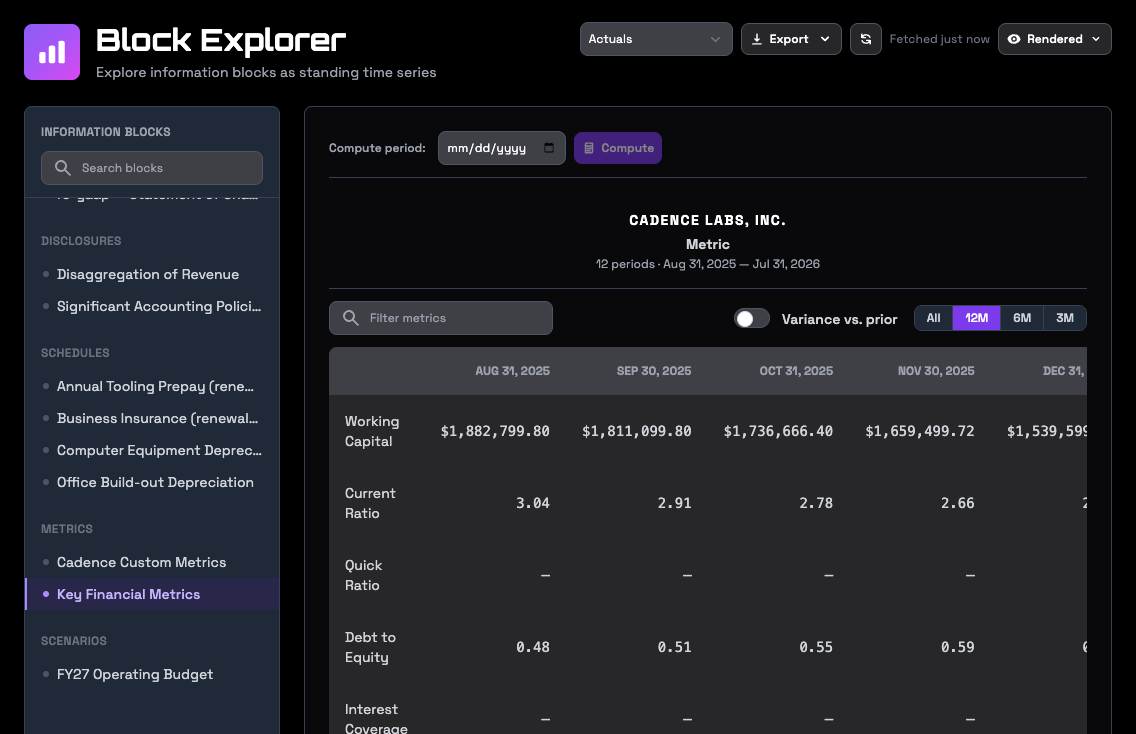
Your assistant can calculate standard ratios from your saved statements, period by period: working capital, current ratio, quick ratio, debt to equity, interest coverage, net profit margin, asset turnover, equity multiplier, and return on equity, on its own and broken into its DuPont parts.
Ask so you can check the answer
- Name the period. "August" or "the third quarter" beats "recently".
- Ask for the accounts. "Break that down by account" turns a claim into something you can tie to QuickBooks.
- Ask for the entries. For any figure that surprises you, ask which transactions make it up.
- Sync first if the question is about the last few days. RoboLedger syncs when you ask, not on a schedule.
Right after a sync or a close, some answers take a little while to catch up. Your assistant can check whether your graph is current before it answers.
In the app
- Ledger → Statements shows live statements for any period, and on a group parent the combined and consolidated statements across the group.
- Ledger → Trial Balance and Ledger → Journal show the detail underneath.
- Explorer opens any statement, note, schedule, set of ratios or scenario as a series over time. Switch between the table, a chart, the facts behind it and the checks it passed, and export to CSV or JSON. See Explore statements and metrics over time.
- Search finds text across the documents in your graph.
- Console lets you ask questions inside the app. It runs on RoboLedger's own AI, so questions use credits. Claude, ChatGPT and other clients you connect yourself don't.
See Find your way around the app.
Documents
Your graph holds documents as well as numbers. Ask your assistant to save your revenue recognition policy, your close procedures or the notes from a board meeting, and they become something it can search and quote later. Before a close, your assistant looks for a close procedures document and follows it.
Your assistant can also remember shorter things across conversations, such as how you treat a vendor or why an account is mapped the way it is. See Documents and memory.
Try asking
- "Why did gross margin drop in August? Show me the accounts that moved."
- "Which vendors grew fastest this year, and what did we spend with each?"
- "Compare operating expenses for the last six months, by account."
- "What's our current ratio for each of the last twelve months?"
- "What did we bill our five biggest customers this year, by month?"
- "Save this as our capitalization policy."
Go deeper
- The two read planes: which questions are answered from the ledger database and which from the graph.